How to Download YouTube Shorts on iPhone, Android and PC
By Qamar Aftab, SaveDock · Updated
YouTube Shorts are short vertical videos, and the YouTube app has no button that saves one as a file you can keep, edit or share. The good news is that you do not need an app either. Your browser can download a Short directly, on any phone or computer, in the original vertical quality. This guide covers iPhone, Android and PC or Mac step by step, then shows how to keep only the sound, how to post a Short as a WhatsApp status, and what to do when something goes wrong.
Tools used in this guide
- YouTube Shorts Downloader
- YouTube Shorts to MP3 Converter
- YouTube to MP4 Converter
- YouTube to M4A Converter
Or paste any link into the main downloader and pick a quality.
Before you start: copy the Shorts link
Every method below starts with the link to the Short. In the YouTube app, open the Short, tap Share (the arrow icon on the right side), then Copy link. On a computer, open the Short on youtube.com and copy the address from the address bar.
All three link formats work: youtube.com/shorts/ followed by the video id, a youtu.be share link, or the normal watch address. The YouTube Shorts downloader recognises each of them, so you never need to edit the link by hand.
Only public and unlisted Shorts can be saved. Private Shorts, Shorts that need a sign-in and age-restricted Shorts are refused, because downloading them would need your Google account, and no honest downloader should ever ask for that.
How to download YouTube Shorts on iPhone and iPad
1. Copy the link to the Short from the YouTube app.
2. Open Safari and go to the YouTube Shorts downloader.
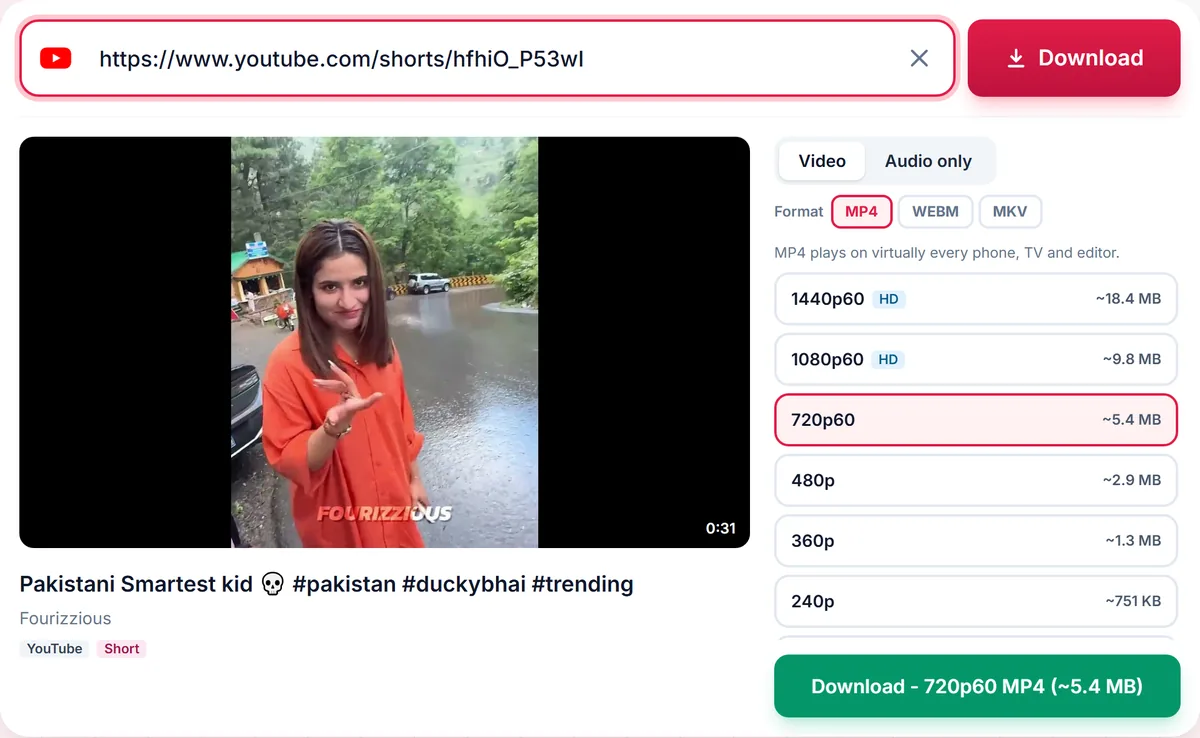
3. Paste the link into the box. The available qualities appear in a few seconds, each with its file size.
4. Choose MP4 and the highest quality listed, usually 1080p, then tap Download.
5. When Safari asks, tap Download again. The file goes to the Files app, under Downloads.
To move the Short into your Photos library, open it in Files, tap Share, then Save Video. Safari is the most reliable browser for this on iOS; other browsers can block or hide downloads. Our longer guide on saving YouTube videos on iPhone covers Files settings and storage in more detail.
How to download YouTube Shorts on Android
1. In the YouTube app, open the Short, tap Share and choose Copy link.
2. Open Chrome, or any browser you use, and go to the Shorts downloader.
3. Paste the link, choose MP4 and a quality, and tap Download.
4. Chrome shows a bar at the bottom of the screen when the file is saved. Tap Open to play it straight away.
The file lands in the Downloads folder. Most gallery apps and Google Photos show it in a Download album; if it does not appear, open the Files app and look under Downloads. Android plays MP4 everywhere, so this is the format to pick. The full Android download guide explains how to change the download folder and save to an SD card.
How to download YouTube Shorts on PC, Mac and Chromebook
On a computer, the steps are the same in Chrome, Edge, Firefox and Safari. Copy the Short address, paste it into the box with Ctrl+V (Cmd+V on a Mac), choose MP4 and press Download, then Save file.
Windows and Mac save the file to the Downloads folder; press Ctrl+J in Chrome or Edge to open the list of downloads. On a Chromebook, open My files, then Downloads. Nothing is installed, so this also works on a school or work computer where new programs are blocked. If you want regular horizontal videos too, use the YouTube to MP4 converter in the same way.
Which quality should you choose for a Short?
Shorts are portrait videos, so quality is measured on the short side. A 1080 by 1920 Short is listed as 1080p, which is the full quality most creators upload. Some Shorts are only available at 720p, because that is what the creator uploaded; no tool can add detail that is not in the original.
Shorts are at most three minutes long, so even 1080p files stay small, and the exact size is shown next to every option before you download. The file keeps the original vertical frame, with no cropping, no black bars and no watermark added. If a download looks soft on a big screen, read which video quality to download to see why a higher number is not always a sharper picture.
How to save only the audio of a Short as MP3
Many Shorts are worth keeping for the sound: a song snippet, a voice clip or a sound effect. Paste the link into the YouTube Shorts to MP3 converter, which opens with the Audio tab already selected, and choose a format.
MP3 plays on every phone, car stereo and editing app. M4A is smaller at the same quality and plays natively on iPhone, and the YouTube to M4A converter offers it for regular videos too. The bitrates on offer are matched to the source: YouTube streams audio at roughly 128 to 160 kbps, so a higher number would only make a bigger file, not a better one. Our comparison of MP3, M4A and Opus explains the difference in plain words.
To use the sound as a ringtone, download it as MP3 on Android, or as M4A on iPhone, and set it in your phone settings or with GarageBand. Only do this with audio you have the right to use.
How to post a YouTube Short as a WhatsApp status
Download the Short as MP4 first; WhatsApp cannot use a YouTube link as a status video. Then open WhatsApp, go to Updates, tap the camera or add-status button and pick the video from your gallery or the Files app. WhatsApp lets you trim the clip before posting, and it may ask you to shorten longer videos or split them into parts.
Because the downloaded Short is already vertical, it fills the status screen with no black bars. The same file works for Instagram Stories and other vertical formats. Ask the creator before you repost their work, and give credit when you do.
Common problems and quick fixes
The link is not recognised: copy it again from the Share menu so it is a clean address. A link from a playlist or a search page can carry extra text.
The Short says it is private or unavailable: the creator has removed it, made it private or limited it to certain countries. These cannot be downloaded.
The video has no sound: this is rare, because audio is merged automatically. Try another quality, play the file in VLC, or follow the steps in why a downloaded video has no sound.
Nothing happens on iPhone: use Safari, and check Settings, Safari, Downloads, so files go to a folder you can reach.
Download Shorts responsibly
Save your own Shorts, Shorts with a licence that allows reuse, and content you have permission to keep. For anything else, YouTube Premium offers official offline viewing that supports creators directly. Nothing you download from SaveDock is kept: finished files are deleted from our servers automatically after a few hours.
Frequently asked questions
Can I download YouTube Shorts without an app?
Yes. Paste the Shorts link into the downloader in Safari, Chrome or any browser and the MP4 is saved directly. Nothing needs to be installed.
Where do downloaded Shorts go on iPhone?
To the Files app, in the Downloads folder. Open the video there, tap Share and choose Save Video to add it to Photos.
Does the downloaded Short have a watermark?
No. The file is the original vertical video, and no watermark or logo is added.
Can I download a YouTube Short as MP3?
Yes. Open the Audio tab, or the Shorts to MP3 converter, and choose MP3, M4A, Opus or WAV.
Is there a length limit?
Shorts are at most three minutes long, and every Short can be downloaded in full.
Is it legal to download YouTube Shorts?
Download only Shorts you own, that are licensed for reuse, or that you have permission to keep, and follow the YouTube Terms of Service.
Keep reading
Only download content you own, that is licensed for download, or that is in the public domain. See our Terms of Service.