Best Video Quality to Download: 720p, 1080p or 4K?
By the SaveDock team · Updated
Higher resolution looks sharper but creates much bigger files. The best choice depends on your screen, your storage and how you will watch the video. Use this guide to choose without wasting space.
Skip the reading?
Use the 4K YouTube Video Downloader or the main downloader.
Match the resolution to your screen
A phone screen rarely benefits from more than 720p. A laptop or full-HD monitor looks great at 1080p. A 4K television or a large 27-inch-plus monitor is where 1440p and 4K shine. Choosing a resolution higher than your screen wastes storage without a visible gain.
Expect big differences in size
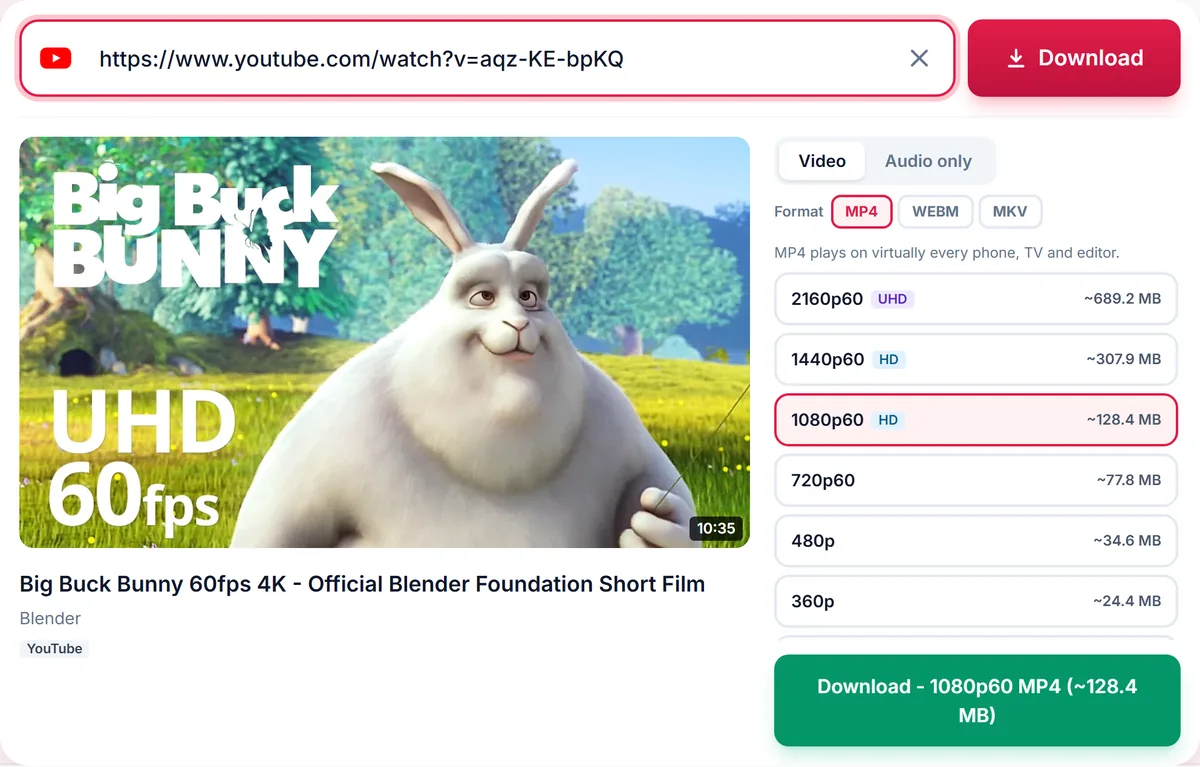
As a rough guide, each step up roughly doubles the file. A short clip that is 120 MB in 1080p may be around 250 MB in 1440p and 500 MB in 4K. Estimated sizes are shown beside every option so you can decide before you download.
Frame rate matters too
Options such as 1080p60 have 60 frames per second and look smoother for games, sport and fast motion. Regular 30 fps is fine for talks, tutorials and most vlogs.
Compatibility
MP4 plays on everything. 4K and HDR files may use newer codecs that need a modern device. If a 4K file does not play, try 1080p MP4 or open the file in a player such as VLC.
A simple rule
Phone: 720p. Laptop or desktop: 1080p. 4K TV or editing: 1440p or 4K. Limited storage: 480p or 360p. Listening only: skip video and download audio.
Quality labels explained
Resolution is the number of pixels. 720p is 1280 by 720, 1080p is 1920 by 1080, 1440p is 2560 by 1440 and 4K is 3840 by 2160. Vertical videos such as Shorts and Reels are measured on the shorter side, so a 1080 by 1920 clip is called 1080p.
Bitrate, the data used per second, also affects sharpness. Two videos at 1080p can look different if one is compressed more heavily. The size shown beside each option reflects both resolution and bitrate.
HDR, 60 fps and codecs
HDR videos have a wider range of colour and brightness but need an HDR-capable screen; otherwise colours can look washed out. 60 fps options look smoother in fast motion. Newer codecs such as VP9 and AV1 give better quality per megabyte but need newer devices to play.
If a file plays with stutter, your device may be struggling with the codec. Download a 1080p MP4, which is the most widely supported combination.
Storage planning
A rough rule: 1080p uses around 50 to 70 MB per minute for typical content, 720p about half of that, and 4K several times more than 1080p. For a 2 hour film that makes 1080p several gigabytes and 4K far larger. Check the size next to the option before you download.
Audio matters too
A great picture with poor audio is disappointing. The audio track in your download is the best available from the source and is merged into the file, so you do not need to choose it separately.
Frequently asked questions
Why is 4K not available for my video?
The uploader did not publish a 4K version. We only list qualities that exist.
Is 1080p enough?
For most screens, yes. It is the best balance of quality and size.
Does 60 fps need a special device?
No, but your screen and player should support smooth playback.
Which container should I use?
MP4 for compatibility. WebM or MKV if you want the original streams.
Keep reading
Only download content you own, that is licensed for download, or that is in the public domain. See our Terms of Service.